
Release Notes
Stay up to date with the latest features and improvements in LilArmy.
March 9, 2026
^ Improvements
- Fields Manager Auto-Save: The Manage Fields dialog now saves your changes automatically as you make them — no more needing to click Save. The Cancel and Save buttons have been replaced with a single Close button.
- New Fields Icon: The Manage Fields button across all views now uses a distinctive "F" icon instead of the gear icon, making it easy to tell apart from the app Settings button.
- Matrix View Fields Button: The matrix view settings button is now larger and more visible, matching the app's design style.
- Clearer Button Labels: The "Reset to defaults" button in the Manage Fields dialog is now labeled "Show only default fields" to better describe what it does. The matrix settings panel header now says "Fields Settings" instead of "Matrix View Settings".
~ Bug Fixes
- Daily Notes Sync: Fixed an issue where syncing from another device would not update a daily note if it was already created locally with empty content. The remote content now correctly replaces empty daily notes.
- Grid View Child Card Creation: Fixed a bug where creating a new card while viewing a card's children in grid view would create the card at the root level instead of as a child of the current card.
March 3, 2026
+ New Features
- Grid View Drag-to-Child: You can now drag a card over another card in the grid view and hold it for a moment to make it a child. A progress ring shows the dwell timer — release after it completes to nest the card. Quick drags still reorder as before.
- Move Up Button: Child cards now have a "Move Up" button in the focused editor, PDF viewer, and drawing annotator toolbars. One click moves the card back to its parent's level and navigates to the new location with the card selected — perfect for undoing accidental nesting.
- Drag and Drop Files from OS: You can now drag files directly from your file manager into LilArmy to create file cards. When inside a card's children view, dropped files are automatically added as children. Works on Linux (via Tauri native drag-drop) and in the web browser.
^ Improvements
- Linux Desktop App Icon: The Linux desktop app now displays the correct LilArmy icon in the title bar and Alt+Tab window switcher, instead of the generic penguin icon.
~ Bug Fixes
- Drawing Content Disappearing on Reload: Fixed a critical bug where cards with Excalidraw drawings would show an empty editor after closing and reopening. The HTML entity decoder was corrupting annotation data inside image tags, causing the editor to fail on reload. Both future corruption is now prevented and already-corrupted cards are automatically repaired when opened.
- File Picker on Linux Desktop: Fixed an issue where the file dialog on the Linux desktop app would not show PDF files and other common file types. The native GTK file picker now correctly displays all files when adding attachments.
March 1, 2026
+ New Features
- Virtual Cursor Indicator: A blinking rectangle overlay at the cursor position makes it much easier to locate your cursor in the editor. The native browser caret is hidden by default for a cleaner look. Fully configurable in Settings > Cursor — adjust color, opacity, height, and toggle the system cursor on or off.
February 28, 2026
^ Improvements
- Native Folder Picker on Desktop: On the desktop app (Windows, macOS, and Linux), selecting a backup folder now uses the native OS file dialog instead of the browser's built-in picker. This means you can choose any folder on your computer — no more "Can't open this folder" errors or confusing origin messages.
~ Bug Fixes
- Google Drive Sign-In on Desktop: Fixed an issue where signing in to Google Drive on the desktop app would immediately show "Session expired" and fail to sync. The sign-in now works correctly and stays connected.
February 26, 2026
+ New Features
- PDF Bookmarks: You can now bookmark pages in any PDF. A bookmark button appears in the toolbar — tap it to save the current page. A dropdown lists all your highlighted pages (bookmarks, drawings, and notes) with colored indicators so you can quickly jump back to important content.
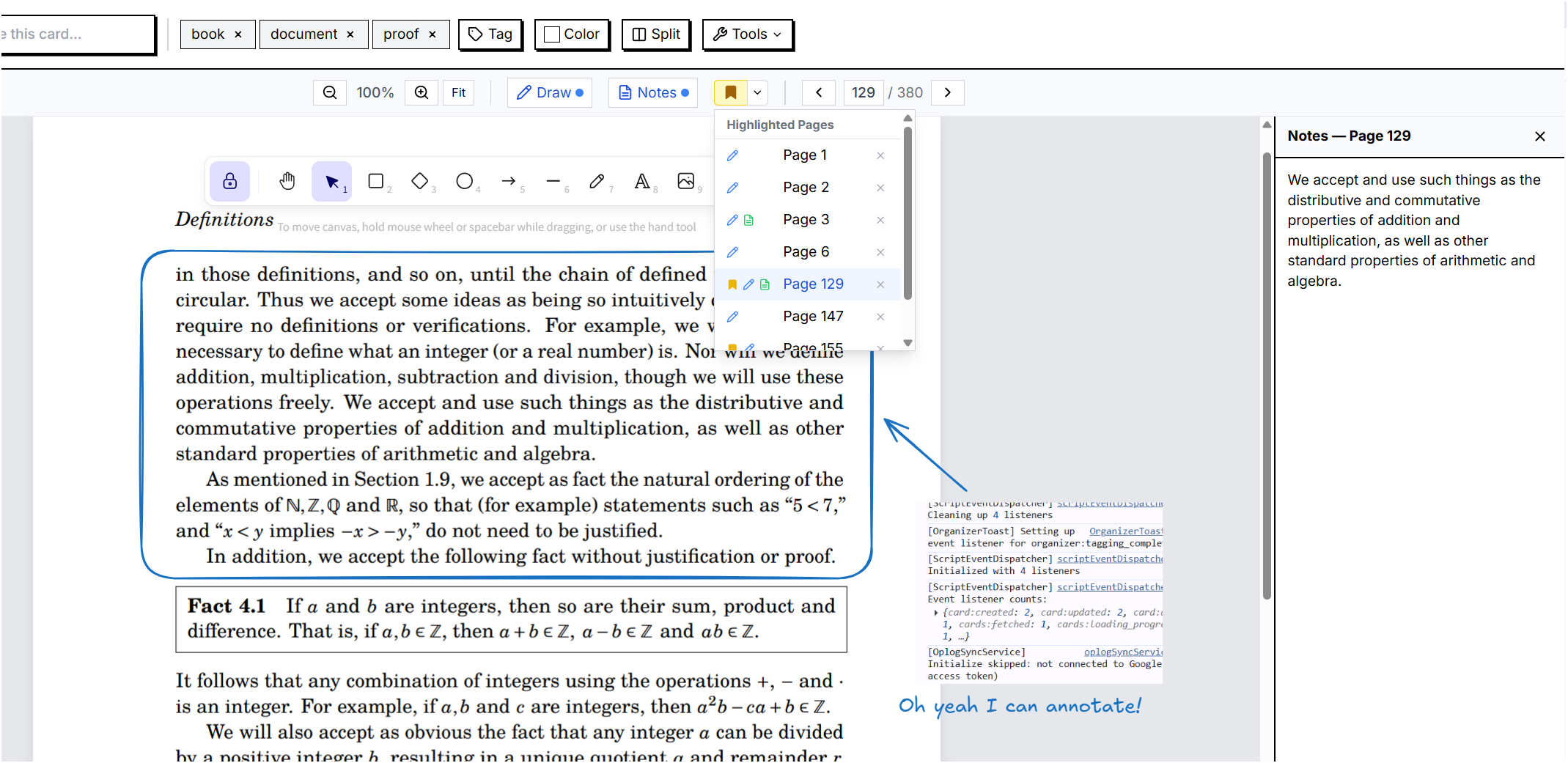
- Inline Child Creation: The focused editor now shows five distinct buttons — Card, Database, Drawing, File, and Paste — so you can quickly create any type of child content without extra menus. Especially handy for Daily Notes.
- PDF Page Input Navigation: You can now type a page number directly into the page indicator to jump to any page in a PDF, instead of only using arrows or scrolling.
^ Improvements
- Reorganized Sidebar Menu: Menu items are now organized into clear groups — Navigate, Create & Organize, AI, and System — with visual dividers, making it easier to find what you need. Colors moved to the toolbar next to Fields for quicker access.
- Smoother PDF Page Navigation: Arrow keys now change pages at scroll boundaries for a more natural reading flow. When going to a previous page, the view scrolls to the bottom so you can read continuously.
- Cleaner Database Cards: Database cards no longer show an inline child list, keeping the view cleaner. Selection count alignment was also improved.
February 25, 2026
+ New Features
- PDF Viewer: PDF files now display with a first-page thumbnail preview on the canvas instead of a generic file icon. Double-click any PDF card — in any view — to open a full-screen reader with page navigation, zoom controls, text selection, and built-in annotation support for links and highlights embedded in the PDF.
- Redesigned Template Picker: The "Create from Template" experience is now faster and easier to browse. Templates appear in a clean alphabetical list showing the emoji, name, description, and field details at a glance. Kanban templates show column counts, and each template opens directly into its preferred view after creation.
- New Built-in Templates: Added 8 new templates covering more use cases — 15 templates are now available out of the box to help you get started quickly.
- Split View: You can now view two cards side by side in any focused view. Click the "Split" button in the toolbar, search for a card, and it opens in a resizable panel next to your current card. Drag the divider to adjust the space each card gets. Works with text notes, drawings, and PDFs.
- Card Selection & Bulk Delete: Select multiple cards using checkboxes across Grid, List, Kanban, Calendar, and Table views. Once selected, delete them all at once with a single click. A floating action bar shows how many cards are selected and lets you clear the selection or delete in bulk.
^ Improvements
- Rename from Child View: You can now double-click the parent card name in the top-right corner of a child view to quickly rename it.
- Focused View Children: The children section in the focused editor now shows up to 6 child cards with a "+N more" indicator, keeping the view clean when cards have many children. Click "Open" to see them all.
~ Bug Fixes
- Drag Reorder Updating Timestamps: Fixed an issue where dragging a card in the grid would change the "last updated" time of every card that shifted position, making them all appear in the "latest" list even though only one card was moved.
- Custom Fields Editing: Fixed an issue where editing custom field values on cards would not save correctly.
- Grid View Search Navigation: Fixed an issue where clicking a search result would not navigate to the card in Grid view.
February 24, 2026
+ New Features
- Grid View: Your home screen now displays cards in a large, visual grid layout. Each card shows an emoji or type icon, the card name, a content preview (text snippets, image thumbnails, link titles, record counts for databases), and a child count badge. Double-click a card's content area to navigate into it.
- Drag and Drop in Grid: You can now reorder cards in the grid by dragging and dropping them. Cards rearrange smoothly and your custom order is saved.
- Fast Card Creation: Adding a new card from the grid view is now instant — no more waiting for position calculations.
^ Improvements
- Inline Emoji and Rename: Click a card's emoji area in the grid to change its icon. Double-click the name to rename it — all without leaving the grid view.
~ Bug Fixes
- Emoji Picker Not Saving: Fixed an issue where clicking an emoji in the emoji picker would close the dialog without actually saving your selection. Emojis now save reliably on click.
- Daily Notes Missing from Calendar: Fixed an issue where daily note cards were invisible in the Calendar view (and all other views) when navigating into the Daily Notes folder. Daily notes now appear correctly in every view.
February 22, 2026
+ New Features
- Quick Draw Button: You can now create a new drawing card directly from the bottom of each Kanban column and the List view using the new "+ Draw" button, alongside "+ Add card" and "+ Quick add". Clicking it creates a drawing in the correct column and immediately opens the drawing editor.
^ Improvements
- Filter Bar Moved to Top Toolbar: The search filter and filter button are now part of the fixed top toolbar in all views (List, Kanban, Table, Calendar, Chart, Matrix), so they stay visible as you scroll through your cards.
- Consistent Card Previews in Matrix View: Cards in the Matrix quadrants, missing data tab, and current data list now show the same rich preview as the Table view, including link URLs, file names, and image/drawing thumbnails instead of plain text names only.
- Image and Drawing Card Preview: Image and drawing cards that have no explicit name now show only the thumbnail preview without a redundant "Untitled" label.
~ Bug Fixes
- HTML Tags in Content Preview: Fixed an issue where raw HTML tags (such as embedded images) appeared as visible text in card previews. HTML is now properly stripped from preview text.
- Mobile Toolbar Overlap: Fixed an issue where toolbar icons and the back button overlapped on mobile devices when viewing a board or database. Icons now wrap properly and no longer cover each other.
- Template Card Navigation: Fixed an issue where clicking "latest" after creating a card from a template would open a blank focused view instead of showing the card's contents. Database and board cards now correctly open in their board view.
- Kanban Column Rename: Fixed an issue where renaming a kanban column inside a board or database would not save the new name. Column renames now persist correctly.
- Kanban Column Delete: Fixed an issue where deleting a kanban column inside a board or database had no effect. Columns can now be deleted properly, and cards in the deleted column are moved to the first column.
- System Cards Hidden from All Views: Favorites, Daily Notes, and other system cards no longer appear in the Canvas, List, Kanban, Table, Calendar, Chart, or Matrix views. These cards remain accessible from the left sidebar menu where they belong.
February 17, 2026
+ New Features
- AI Fact Extraction from Cards: The new Fact Extractor agent reads your cards and extracts structured facts about People, Places, History, and Decisions. Facts are stored in the database and automatically injected into the Keeper's memory so it can recall what it has learned during conversations. The agent processes cards in the background as they are created or updated.
- Memory Configuration: A new "Memory" tab in Settings lets you see how many facts have been extracted (broken down by category), export all memory to a card, disable memory extraction, or erase all stored facts.
- Chat Moved to Menu: The Chat button has moved from a floating icon to the left sidebar and mobile hamburger menu, positioned above Agents. This keeps the canvas cleaner and makes Chat a first-class navigation item.
- Evaluation System: A standalone evaluation harness (
eval/) for testing the quality of fact extraction and memory-informed conversations using LLM-as-judge scoring. Run withcd eval && npx vitest run.
↑ Improvements
- Keeper Remembers Your Facts: The Keeper's conversation now includes extracted facts in the system prompt, so it can reference people, places, history, and decisions from your cards and past conversations. Previously the AI had no access to extracted memory.
- Memory Stored in Database: Extracted facts from conversations are now stored in a dedicated database table instead of being created as cards. This avoids the infinite card-create-extract loop and keeps your card space clean.
- Set Up AI Provider from Chat: When no AI provider is configured, the Chat panel now shows a "Set Up AI Provider" button that opens Settings directly to the AI tab.
February 15, 2026
~ Bug Fixes
- Sync Getting Stuck: Fixed an issue where Google Drive sync could get stuck near the end of downloading changes. The sync would appear frozen at the final count even though all data had been received. This was caused by an internal re-initialization that accidentally cancelled the sync in progress.
- Sync Continues in Background: Closing the Data Sync panel no longer cancels a running sync. Your sync will now keep running in the background and complete even after you close the dialog. You can still cancel manually using the Stop button.
- Back Button Returns to Correct View: Fixed an issue where pressing the browser back button after opening a card from Kanban (or List, Calendar, etc.) would always land on the Canvas view instead of returning to the view you were on. The back button now correctly restores the previous view mode.
February 13, 2026
↑ Improvements
- Calendar View Remembers Your Selection: Your choice of Year, Month, or Week view in the calendar is now saved. Previously it would reset to Year view every time you navigated away and came back.
- Calendar Sub-View in URL: The selected calendar view (Month, Week) is now included in the URL, so it's preserved when navigating into Daily Notes or other child views, and when sharing links.
~ Bug Fixes
- Card Preview Popup: Fixed a console warning that appeared when hovering over cards in the calendar Week view.
February 12, 2026
+ New Features
- Calendar Color By Field: Color cards in all calendar views (Year, Month, Week) by selecting a custom dropdown field. See at a glance which cards have which status, category, or any other select field value. The "Color by" dropdown appears when you have select-type custom fields defined.
↑ Improvements
- Daily Notes Calendar Views: Year and Week calendar views now work properly when viewing Daily Notes. Auto-creation of daily notes only triggers in Month and Week views where it's most useful.
- Custom Fields for Daily Notes: Daily note cards now properly display and allow editing of root-level custom fields in the focused editor view.
February 9, 2026
+ New Features
- Latest Cards in Sidebar: Your 5 most recently updated cards now appear in the left sidebar menu for quick access. No more searching for cards you were just working on.
- Tools Dropdown: Common actions are now organized in a new Tools menu at the top. Find Fields, Actions, Scripts, Group, Summarize, and Split all in one convenient dropdown.
↑ Improvements
- Better Mobile Focused View: The focused card view on mobile has been redesigned with a cleaner back button, info toggle, and improved parent card display.
- Mobile Safe Area Support: UI elements now properly respect device notches and home indicators on mobile devices.
~ Bug Fixes
- Bulk Move Consistency: Fixed an issue where moving multiple cards at once could leave the display out of sync with actual card positions.
- Dialog Stability: Fixed dialogs accidentally closing when clicking inside them.
February 8, 2026
+ New Features
- Voice Commands Beta: Control LilArmy hands-free with voice commands. Press and hold the microphone button in the sidebar, speak your command, and release. Create cards, open cards, search, switch views, and more—all by voice. Works in both English and Portuguese. Voice recognition runs entirely on-device using Whisper.js, so your voice data never leaves your device. See all available commands →
- Voice Dictation Beta: Dictate text directly into your cards. When editing a card in focused view, click the microphone button to start dictating. Your speech is converted to text and inserted at the cursor position. Perfect for capturing ideas quickly without typing.
- Chart View: Visualize your data with the new Chart view. Track trends over time by charting card counts grouped by date fields like creation date or custom date fields.
- Export to Markdown: Export any card and all its children to a single Markdown file. The export uses proper heading levels based on hierarchy (# for root, ## for children, etc.) and includes metadata under each card title: created date, last updated, tags, kanban status, and custom field values. The file auto-downloads with a clean filename based on the card name and timestamp.
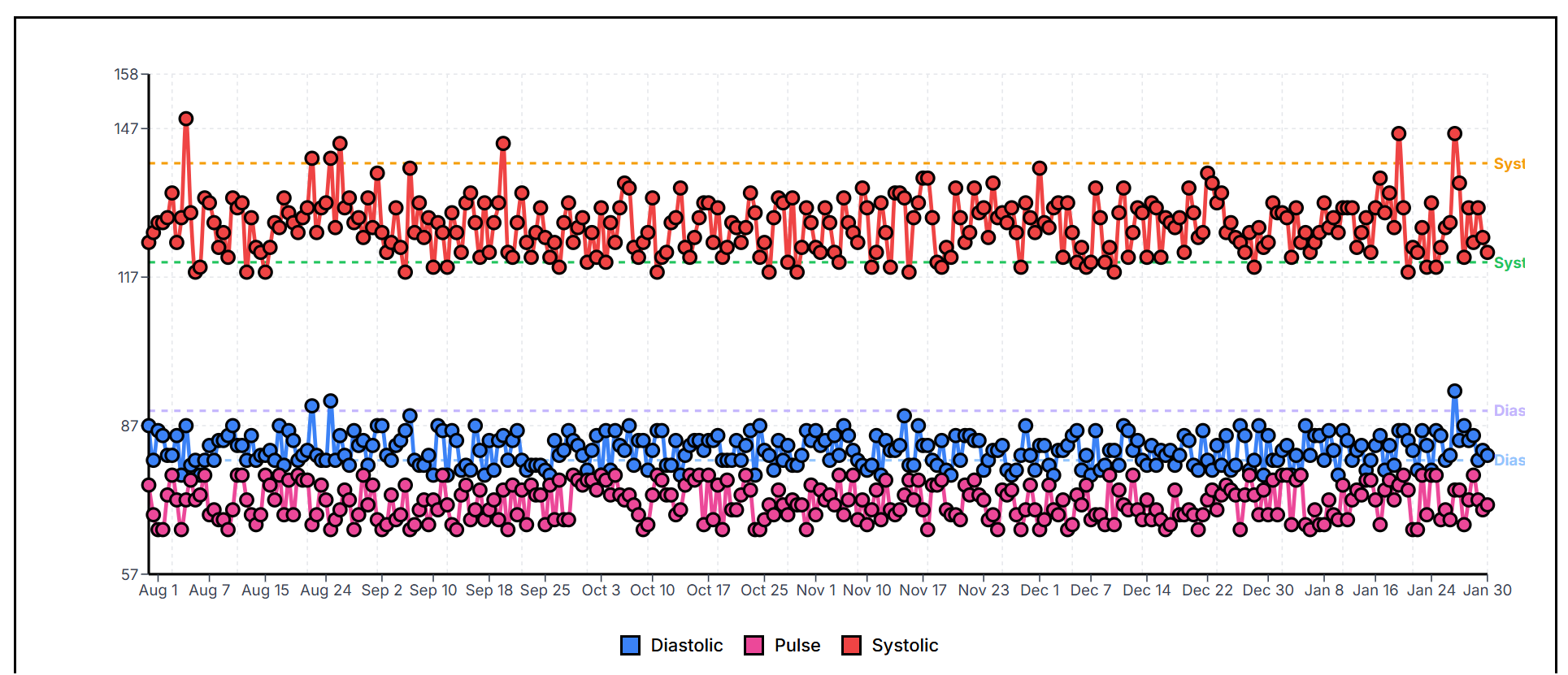
Example: Blood pressure monitoring with systolic, diastolic, and pulse readings
↑ Improvements
- Faster Canvas Performance: Dragging cards on the Canvas is now significantly smoother, especially when working with many cards at once.
~ Bug Fixes
- Sync Reliability: Fixed an issue where the interface wouldn't update immediately after syncing data from the cloud. Changes now appear right away.
February 5, 2026
+ New Features
- Kanban View Filter: You can now filter cards in Kanban view the same way you filter in Table view. Type to search and instantly see only matching cards.
- Drag to Add Children in Kanban: Drag a card over another card's "Open" area at the bottom, hold for a moment until the progress ring completes, then release to add it as a child. This matches the Canvas view behavior.
- Bulk Move in Table View: Move all visible cards at once to a new location. Select your destination and all filtered cards will be moved together—great for reorganizing many cards quickly.
↑ Improvements
- Delete Confirmation for Parent Cards: When deleting a card that has children, you now see a confirmation dialog explaining what will happen. No more accidental deletions of entire card hierarchies.
- Clearer Add-Child in Canvas: In Canvas view, you can only add a child when exactly one card is selected. This prevents confusion about which card will become the parent.
- Faster Bulk Operations: Deleting or moving many cards at once is now significantly faster. The interface updates all changes together instead of one at a time.
~ Bug Fixes
- Table Filter Now Finds Exact Matches: Fixed an issue where searching for a card by its exact title wouldn't show results. Search now correctly finds cards regardless of case.
- New Cards Auto-Selected: When creating a new card in Table view, it's now automatically selected so you can start editing immediately.
- Canvas Arrangement Stability: Fixed issues where arranging cards could sometimes cause display problems. Card positions are now properly validated during all operations.
February 2, 2026
+ New Features
- Matrix View Tabs: The Matrix View now has three tabs: "Matrix" (the 2x2 grid), "Missing Data" (cards that need Priority/Effort values), and "All Cards" (a table view of all cards with inline field editors).
- Missing Data Tab: Quickly see which cards are missing matrix field values. Edit Priority and Effort directly from the table without opening each card. A badge shows the count of cards needing attention.
- All Cards Tab: View and edit all cards in a compact table format. Perfect for bulk-editing Priority and Effort values across many cards at once.
- Drag and Drop Option Assignment: In Matrix Settings, drag field options between "Low" and "High" sides to configure how cards are positioned on each axis. No more clicking buttons—just drag options where you want them.
- Quadrant Color Picker: Customize each quadrant's color using the full color picker with palettes, custom colors, and hex input. Colors now persist and display correctly on the matrix grid.
- Matrix Templates: Choose from three pre-built templates when setting up Matrix View: Priority & Effort (default), Eisenhower Matrix (Urgent vs Important), or Risk Assessment (Impact vs Likelihood). Each template automatically creates the right fields with appropriate options.
↑ Improvements
- Inline Validation: Matrix Settings now shows validation messages next to each axis field, making it clear which axis needs attention (e.g., "Add at least one option to High side").
- Smart Option Auto-Assignment: When opening Matrix Settings, field options are automatically distributed between Low and High sides. New options added to fields appear automatically in the settings.
- URL-Persisted Tab State: The active Matrix tab is saved in the URL. Refresh the page or share a link—the selected tab is preserved.
- Reduced Auto-Save Flicker: The "saving..." indicator in Matrix Settings now only appears when changes are actually being saved, not on every keystroke.
- Tags Visible in Collapsed Mode: In List and Kanban views, tags now display next to the tag button even when cards are in collapsed mode. Previously, tags were only visible in expanded mode.
- Consistent Matrix Setup Dialogs: The Matrix View setup dialog now has the same visual style and layout whether you're at the root level or inside a board. Both show template selection and clear instructions.
February 1, 2026
+ New Features
- Calendar View: A brand new 5th view mode that visualizes your cards along a timeline. Switch between Year, Month, and Week views to see your activity patterns, plan ahead, or review what happened.
- Year View: A GitHub-style heatmap showing your entire year at a glance. Each square represents a day, colored by your cards. Click any day to jump to that month.
- Month View: A traditional calendar grid showing cards as colored chips on their dates. Click any card to open it in the editor.
- Week View: A detailed 7-day view perfect for weekly reviews. See all your cards for the current week with full card previews.
- Date Field for Cards: Cards now have an optional date field. Set a specific date for any card to position it in the calendar, independent of when it was created.
- Drag and Drop in Calendar: In Month and Week views, drag cards between days to quickly change their date. (Only available when viewing by "Date field", not "Created".)
- Card Preview Popups: Hover over any card in the calendar to see a preview popup with images, content, and tags without leaving the calendar view.
↑ Improvements
- Multi-Color Day Squares: In Year view, days with multiple colored cards show horizontal stripes (up to 4 colors). Days without any colored cards appear white.
- Today Button: Quickly navigate to the current date in any calendar view. Works consistently across Year, Month, and Week views.
- Toggle Date Source: Switch between viewing cards by their explicit "Date field" or by "Created" date. See when cards were actually created versus when you marked them.
February 1, 2026
+ New Features
- Demo Mode URL Parameters: You can now use special URL parameters to skip startup dialogs and automatically create a new card. Use
?skipall=trueto bypass the template picker and daily notes navigation, and add&action=newcardto automatically create and open a blank card in the editor. Perfect for screen recordings, demos, and testing.
January 31, 2026
+ New Features
- Card Actions Menu: A new "Actions" dropdown in the children view header provides Copy, Paste, and Duplicate operations for cards. The menu adapts to mobile screens showing only an icon, similar to the Scripts dropdown.
- Deep Copy & Duplicate: When you copy or duplicate a card, all of its children (and their children, and so on) are now included. This lets you duplicate entire hierarchies of cards in one action, perfect for creating templates or reorganizing your content.
~ Bug Fixes
- Card Actions on Selected Card: Copy, Paste, and Duplicate now correctly operate on the selected card within the children view, not the parent card. New cards are also placed properly within the current children view.
January 31, 2026
+ New Features
- Open Empty Cards: You can now navigate into any card's children view, even if it has no children yet. This lets you "open" a card like a folder and start adding content inside. Look for the "Open" button with a folder icon on cards without children in List, Kanban, Table, Canvas, and Focused views.
January 31, 2026
↑ Improvements
- Redesigned Table Filters: The type and status filters are now combined into a clean, unified filter bar at the top of the table. Both filters use dropdown menus with icons and labels for easier selection.
- Multi-Select Type Filter: Filter cards by multiple types at once. Select "Note", "Link", "Image", "Drawing", or "File" in any combination, or choose "All types" to see everything.
- Colored Status Filter: The status filter dropdown now displays your kanban column colors, making it easier to identify and select the status you want to filter by.
- Consistent Sort Indicators: Column sort arrows now match the style of dropdown chevrons throughout the app for a more cohesive look.
- Sidebar Toggle Always Visible: The collapse/expand button at the bottom of the sidebar is now always visible, even when you have many cards in the tree.
~ Bug Fixes
- Table Column Alignment: Fixed misaligned columns in table view. The emoji column and card names now line up correctly whether or not cards have colors or emojis assigned.
January 31, 2026
↑ Improvements
- Improved Readability: Increased font sizes across the entire interface following WCAG accessibility guidelines. Body text in cards now uses 16px (up from 14px), UI labels and buttons use 14px minimum (up from 12px), and headings are proportionally larger. This makes the app more comfortable to use, especially on high-resolution displays.
- Better Touch Targets: Buttons, menu items, and interactive elements now have more padding and larger click/tap areas for easier interaction on both desktop and mobile devices.
- Consistent Typography: Standardized font sizes across all views (Canvas, List, Kanban, Table) and dialogs for a more cohesive visual experience.
- More Resilient Sync: Sync is now much more patient with network issues. If you lose WiFi temporarily (like in an elevator or switching networks), sync will quietly retry for about 2.5 minutes before showing an error. Early connection issues show a gentle "retrying" message instead of alarming error notifications.
~ Bug Fixes
- Favicon 404 Error: Fixed the browser console error where requesting
/favicon.icoreturned a 404. The favicon is now correctly served from the app's base path. - Sync Errors with Special Characters: Fixed sync errors that occurred when syncing certain types of data (like scroll positions and embeddings) that have special characters in their identifiers.
January 30, 2026
+ New Features
- Card Scripts & Custom Buttons: Add Python scripts to any card that execute when you click custom buttons. Create automated workflows like habit trackers, quick logging, or any custom automation you need. Scripts run in-browser using Pyodide with access to the card API.
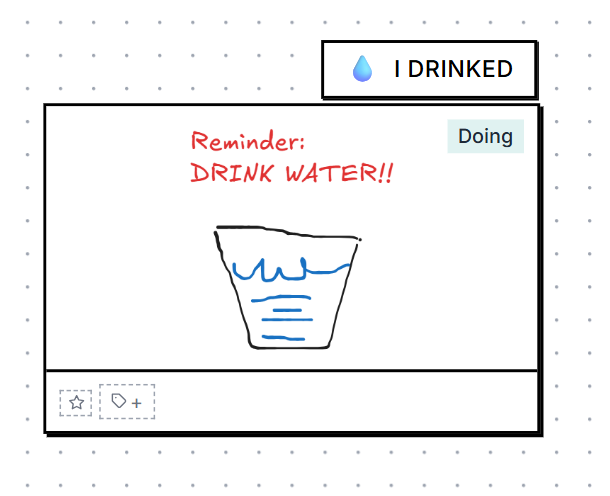
- Script Buttons in All Views: Custom script buttons now appear across all card views:
- Canvas View: Buttons appear on top of the card for quick access
- List View: Buttons appear in the card's action bar
- Kanban View: Buttons appear in the card's action bar
- Table View: Optional "Scripts" column (enable via Fields Manager)
- Per-Button Scripts: Each button can have its own Python script, allowing multiple automations on a single card. Primary buttons show directly on the card while overflow buttons appear in a dropdown menu.
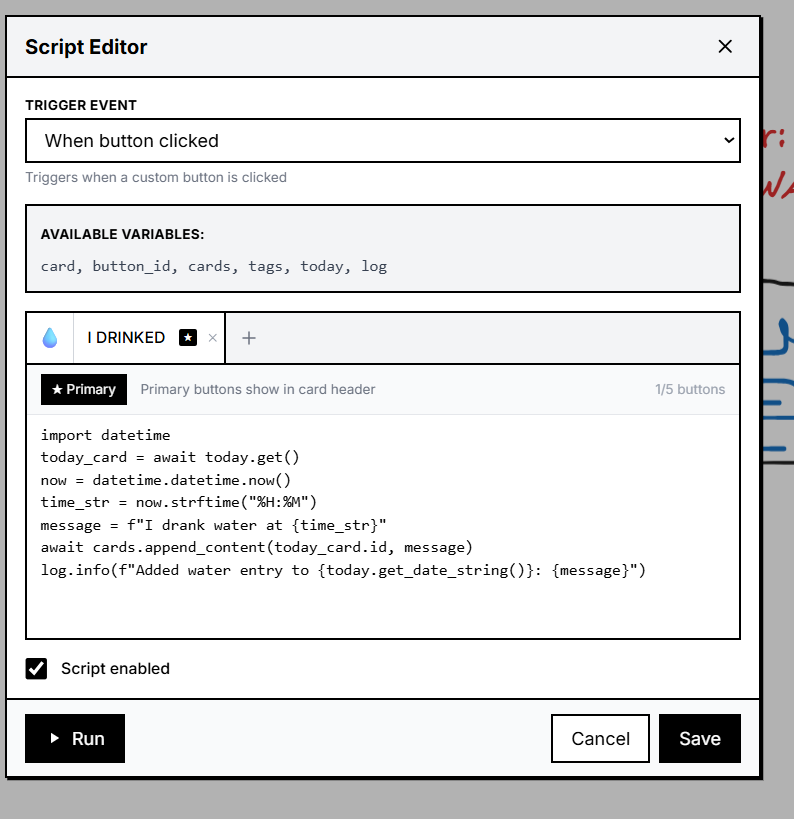
- Today Variable in Scripts: Scripts can access
today.get()to get or create today's daily note card, andtoday.get_date_string()to get the formatted date string. - Card Content API: New script methods
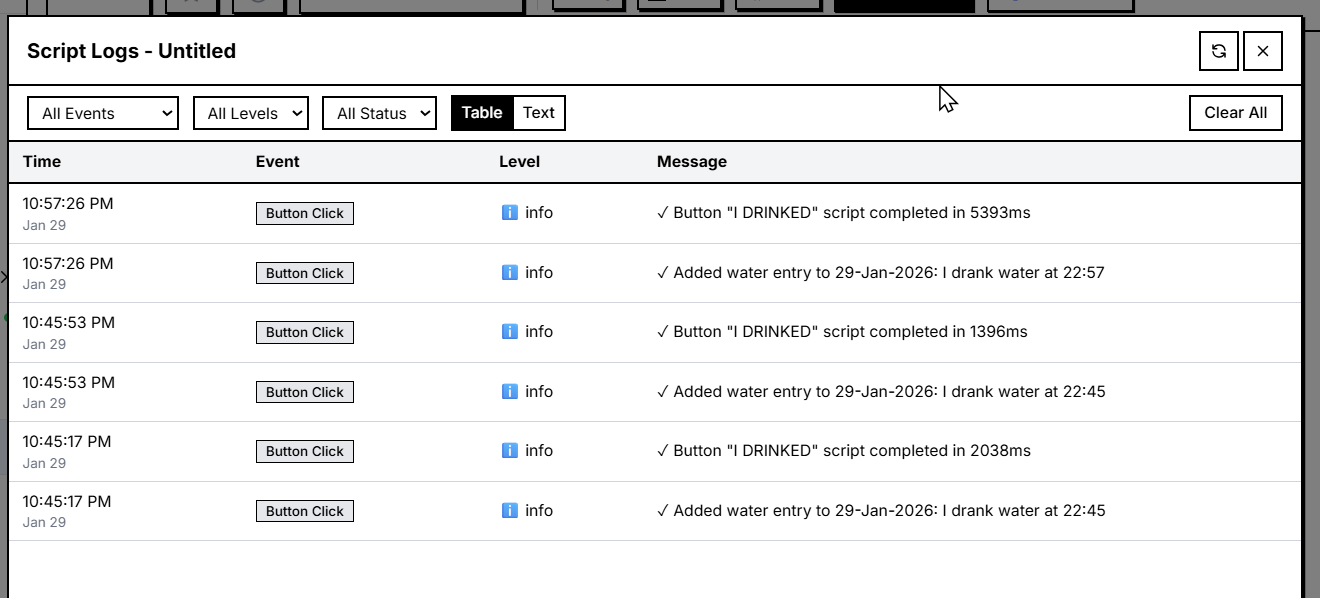
cards.set_content()andcards.append_content()allow scripts to modify card content, perfect for logging and journaling automations. - Script Logs Panel: View execution history and debug information for your scripts. Access logs from the Script dropdown menu to see when buttons were clicked, script output, and any errors.
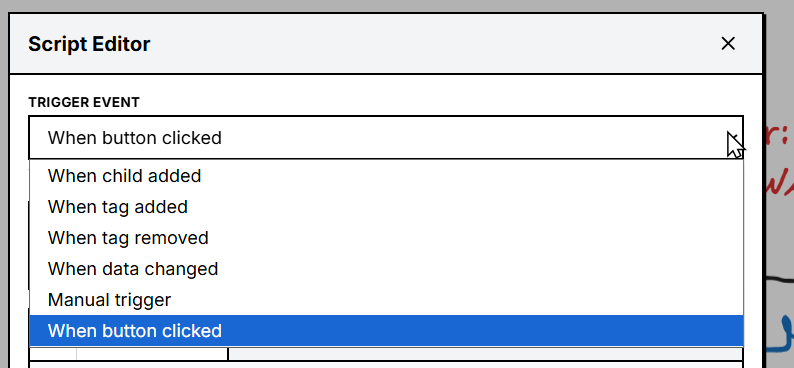
- Multiple Trigger Events: Scripts can be triggered by various events including button clicks, child card additions, tag changes, data changes, and manual triggers.
↑ Improvements
- Brutalist Script Editor UI: The script editor and button dropdowns now follow the app's brutalist design language with clean borders, shadows, and consistent styling.
- Radix Tabs in Script Editor: The script editor now uses Radix UI tabs for switching between the script code and button configuration panels.
- Increased Script Rate Limit: Scripts can now execute more frequently (5 times per second per card) for responsive button interactions.
- Root-Level Table Fields: The FIELDS button is now available in Table view at the root level (when viewing all cards without a parent). Configure which system columns to show and their order for your top-level table view.
~ Bug Fixes
- Grouper Agent Icon: Fixed the Grouper agent icon not displaying correctly in the agents panel.
January 29, 2026
+ New Features
- Summarize Cards: Select one or more cards and click the new Summarize button to create a summary card with bullet points capturing the key information. The summary includes a descriptive title and timestamp showing when it was generated.
- Split Cards: Select a card with long content and click the new Split button to break it into multiple cards by topic. The AI analyzes your content and creates separate cards for each distinct section or theme.
↑ Improvements
- Reorganized Control Panel: The canvas action buttons (Arrange, Group, Summarize, Split, Trash) have been moved to the bottom-right corner, positioned above the view mode selector for easier access.
- Mobile-Friendly Controls: Action buttons are now smaller on mobile devices to prevent overlap with the sidebar menu, while remaining easy to tap.
January 28, 2026
↑ Improvements
- Improved Search Relevance Display: Search results now show the maximum of keyword and semantic scores instead of a weighted combination. This means when you search for "productivity tips" and find a note about "morning routines" (which has 80% semantic similarity but no keyword match), you'll now see 80% instead of the confusing 48% that was previously shown.
~ Bug Fixes
- Legacy Sync File Handling: Fixed an issue where older sync operation files were being skipped during sync with "Skipping malformed operation file" warnings. The sync system now properly handles both the newer batch format and legacy single-operation files.
January 26, 2026
↑ Improvements
- AI Agent Compatibility Notice: If your device doesn't have a compatible GPU for AI features, you'll now see a friendly notification explaining that AI agents (Organizer, Searcher, Linker, and Grouper) have been disabled. You can continue using all other features normally.
~ Bug Fixes
- Sync Existing Cards: Fixed an issue where cards created before enabling sync would not be uploaded to Google Drive. Now when you enable sync for the first time, all your existing cards are uploaded automatically.
- Quick Add Form Fields: Fixed an issue where database fields weren't appearing in the Quick Add form when creating new cards in Kanban, List, or Table views.
January 25, 2026
+ New Features
- Database Cards: Create your own structured databases with custom fields. Define text, number, dropdown, date, and checkbox fields to organize your data exactly how you need it. Perfect for tracking expenses, managing projects, or building any custom workflow.
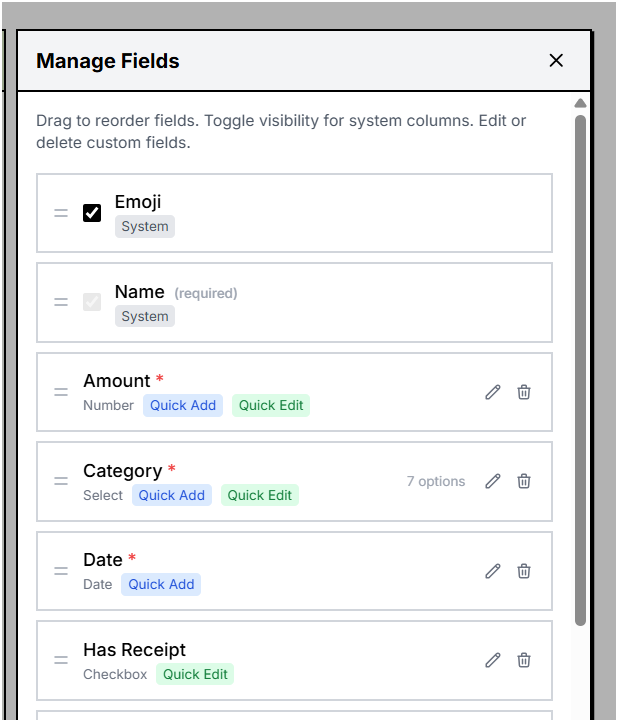
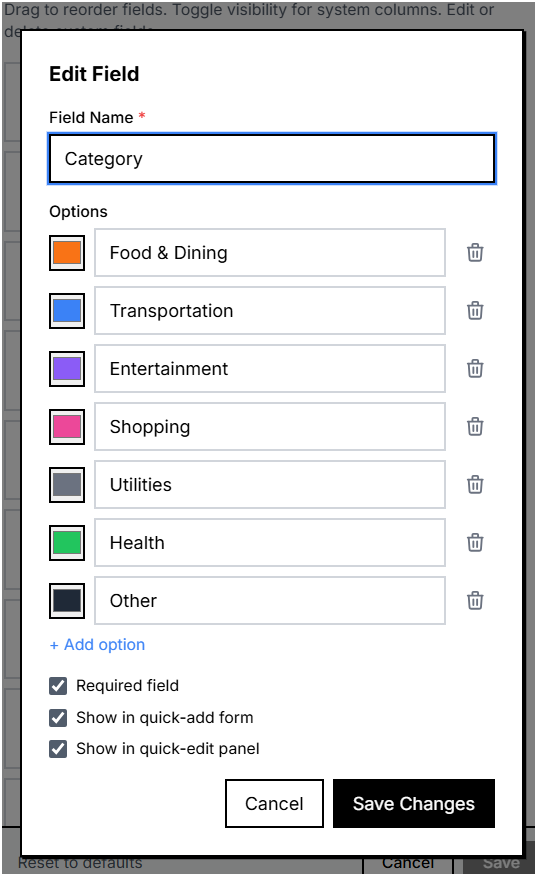
- Field Validation: Database fields now support validation rules. Number fields can have minimum and maximum values, and dropdown fields display their available options.
- Database Templates: Get started quickly with pre-built database templates. Choose from templates like Expense Tracker, Project Management, and more. Each template comes with pre-configured fields and sample data to help you get started.
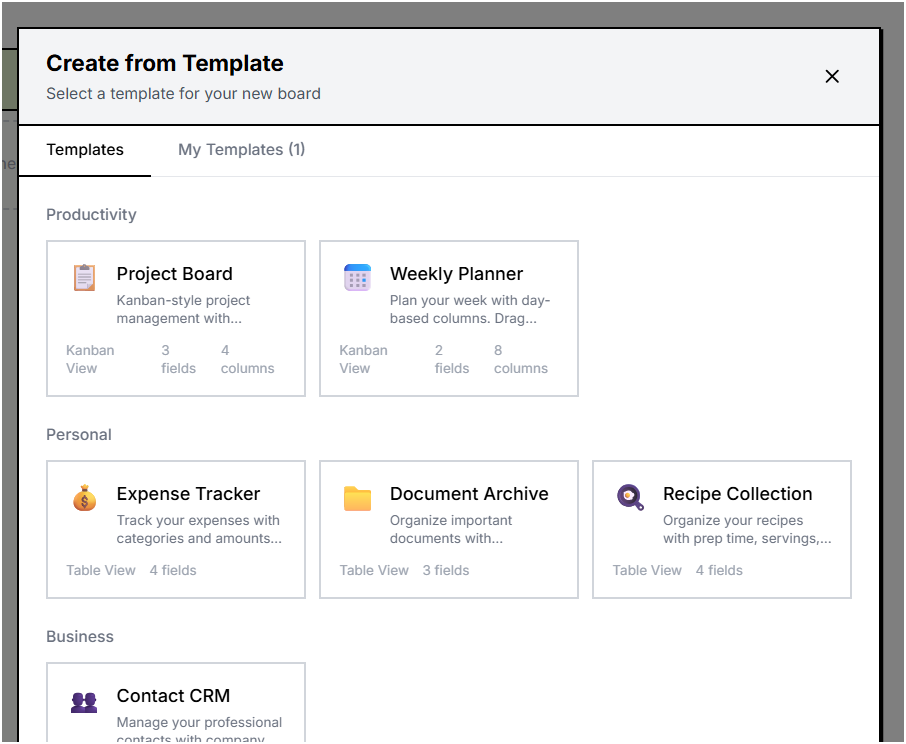
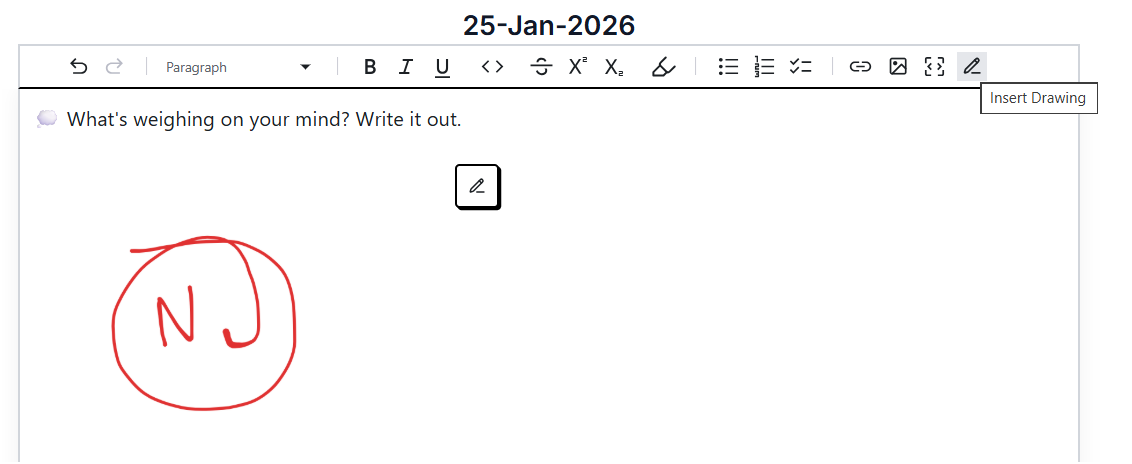
- Insert Drawings: Add hand-drawn sketches, diagrams, and annotations directly into your notes. Click the drawing button in the editor toolbar to create a new drawing that embeds seamlessly into your content.
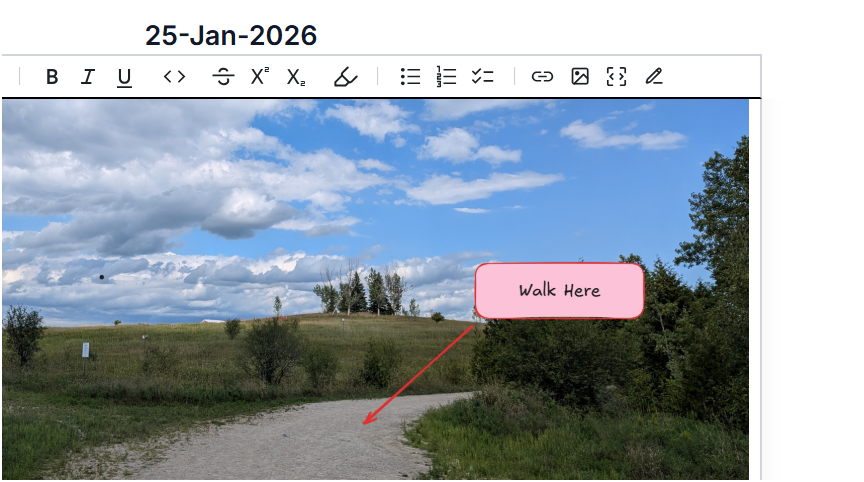
- Image Annotations: Annotate any image pasted into your cards. Click on an inline image to open the annotation editor and add drawings, highlights, or notes directly on top of the image.
- Smart Card Links: Link any card to any other card using the
[[card name]]syntax. Links are displayed as clickable references with hover previews showing the linked card's content.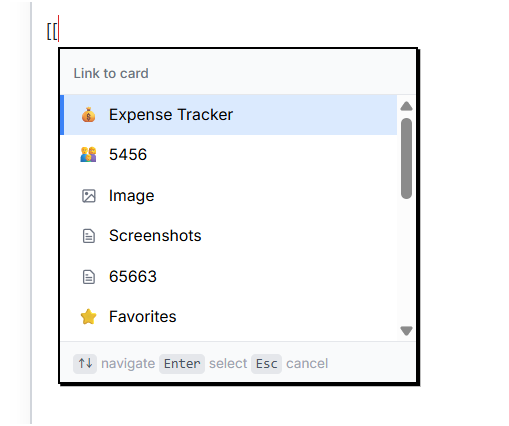
↑ Improvements
- Card Link Autocomplete: When typing
[[to create a card link, an autocomplete dropdown appears showing matching cards. Use arrow keys to navigate and Enter to select, making it faster to link cards together. - Templates in Left Menu: Database templates are now accessible from the left sidebar menu for quicker access to creating new structured cards.
- Custom Fields in Focused View: When editing a card that belongs to a database, the custom fields now appear at the top of the focused editor for easy access.
- Quick Add Form for Databases: When viewing a database card in List, Kanban, or Table view, adding a new card now uses a quick add form that shows the database fields, making it faster to add structured data.
- Customizable Table Columns: In Table view, you can now reorder, show, or hide columns including system columns (Name, Tags, Status, Created, Updated). Drag and drop columns to arrange them exactly how you want.
- Keyboard Navigation for Dropdowns: Dropdown fields now support full keyboard navigation - use arrow keys to move between options, Enter or Space to select, and Escape to close.
- Sync on Mobile Browsers: Sync settings are now preserved when using the app on mobile browsers. Previously, sync progress could be lost when closing the browser tab.
- More Reliable Sync: Background sync now continues running even after temporary network issues or errors, automatically retrying until connection is restored.
- Smarter Card Placement: New cards are now automatically placed in empty spaces on the canvas to avoid overlapping with existing cards.
~ Bug Fixes
- Sync Now Button: Fixed an issue where the Sync Now button wouldn't work if you signed in after opening the app.
- Search for Short Cards: Fixed an issue where cards with meaningful names but short content weren't appearing in search results.
- Table View Inline Editing: Fixed inline editing of number, dropdown, and date fields in Table view not saving changes.
- Table View Column Cropping: Fixed an issue where table columns could be cropped beyond the visible area when scrolling horizontally.
- Quick Add Form Name Saving: Fixed an issue where the name field in the quick add form wasn't being saved properly.
- Database Field Deletion: Deleting a database field now preserves the data in cards, allowing recovery if you re-add the field later.
- Back Navigation from Links: Fixed the back button not returning to the correct card after navigating via a card link.
January 22, 2026
+ New Features
- Append-Only Oplog Sync: Completely redesigned Google Drive sync architecture using an append-only operation log. Each change is recorded as a separate operation file, enabling reliable multi-device sync with automatic conflict resolution using last-write-wins semantics.
- Multi-Device Support: Each device now has a unique identifier and can sync independently. Operations from other devices are automatically discovered and applied, with proper conflict handling when the same entity is modified on multiple devices.
- Checkpoint System: Periodic checkpoints compact the operation log by creating snapshots of the current state. This reduces storage usage and speeds up sync for new devices joining the sync.
- Inline Image Annotations: Annotate images directly within the markdown editor. Click on an inline image to open the annotation editor with Excalidraw tools. Annotations are saved as embedded data within the image, making the content fully portable.
↑ Improvements
- Complete Entity Sync: All entity types are now synchronized via Google Drive: cards, images, files, tags, settings, and embeddings. Previously only cards were synced through the oplog system.
- Embedding Sync: Card embeddings and paragraph embeddings are now synced across devices, preventing expensive recalculation of AI embeddings when switching between devices.
- Image Resize in Editor: Inline images in the markdown editor can now be resized by dragging the corner handles.
January 20, 2026
↑ Improvements
- Simplified Daily Reflection Prompt: The journaling question format has been simplified to show just the category emoji and question, making it cleaner and less intrusive when starting daily notes.
- Fit View on Navigation: When navigating to a card's children from the left sidebar, the canvas now automatically fits all cards in view if no saved viewport exists, making it easier to see all content at once.
- Logo Links to Website: Clicking the LilArmy logo in the left sidebar now opens the LilArmy website in a new tab.
~ Bug Fixes
- Daily Note Card Parent Reference: Fixed an issue where the daily note card returned by the system wouldn't have its
parentIdset, causing the card to appear disconnected from the Daily Notes parent card until a page refresh. - Trash Synchronization: Fixed a synchronization bug where deleted cards (trash) could have different counts across devices. The sync engine now uses the
deletedAttimestamp for trash entity comparisons instead ofupdatedAt, ensuring proper last-write-wins behavior for deletions.
January 19, 2026
+ New Features
- Daily Reflection Journaling: New daily notes now include a journaling prompt to help with self-reflection. 40 curated questions rotate daily across categories like gratitude, growth, values, emotions, and goals. Can be disabled in Settings > General > "Include Daily Reflection".
- System Card Emojis: Daily Notes (📓) and Favorites (⭐) cards now display emojis for quick visual identification. Existing cards are automatically migrated.
- Image Annotator Name Editing: Edit card names directly in the image annotator view with a 99-character limit and debounced auto-save.
- Image Annotator Tag Management: Tag chips are now displayed in the annotator header. Add new tags via the tag button or remove existing ones by clicking the X on each chip.
- Image Annotator Color Picker: Change the card's background color directly from the annotator. The header background updates to reflect the card's display color.
- Image Annotator Move Button: Move image cards to root level or under any other card using the CardPickerDialog, without leaving the annotator view.
↑ Improvements
- Smarter Card Placement: New cards created with the 'N' key are now positioned to the right of the currently selected card instead of the viewport center. If no card is selected, cards are placed at the viewport center with automatic non-overlapping positioning.
- System Card Protection: Daily Notes and Favorites cards are now protected from accidental deletion. They cannot be deleted via drag-to-trash or keyboard shortcuts.
- Better Initial Card Layout: Daily Notes and Favorites cards are now positioned side-by-side when first created, with proper spacing instead of overlapping.
- Quick Guide Disabled by Default: The quick guide popup no longer shows on startup by default. Users can re-enable it in Settings > General.
- Timestamp-Based Sync Detection: Replaced the syncStatus field with timestamp-based sync detection using
lastSyncedAtandupdatedAtcomparisons. This simplifies the sync logic and improves reliability. - Parallel Sync Downloads: Download operations for new and updated remote items now run in parallel batches of 50, matching the existing parallel upload behavior for faster sync performance.
- Data Icon in Collapsed Sidebar: The collapsed left sidebar now shows the Data (database) icon instead of the Sync icon. Clicking it expands the sidebar and opens the Data submenu.
~ Bug Fixes
- Canvas Multi-select Name Editor: Fixed the name editor displaying when multiple cards are selected. The name editor now only appears when a single card is selected.
- New Tiles Added to Correct Parent: Fixed an issue where new tiles created while viewing a child card's children were being added to root instead of under the current parent card.
- View Mode Persistence: Fixed a race condition that caused the per-card view mode to reset when any card was updated. View mode now only changes when actual navigation occurs.
January 18, 2026
+ New Features
- Organizer Toast Notifications: When the Organizer agent finishes tagging a card, a toast notification appears showing the card name and applied tags. Includes a "View card" button to navigate directly to the tagged card.
- Searcher Agent Icon in Search: When semantic search is enabled, the search panel displays the Searcher agent icon instead of the standard search icon, indicating AI-powered search is active.
- Drawing Card Preview in Smart Links: Hovering over a smart link to a drawing card now shows a thumbnail preview of the drawing instead of empty content.
↑ Improvements
- Mobile-Responsive Dialogs: All dialogs and panels now properly fit on narrow screens. Updated ConfigurationsPanel, AgentActivityPanel, AgentConfigurationPanel, KanbanColumnSettingsPanel, ToolCatalog, SyncPanel, and TrashPanel to use viewport-relative widths.
- Responsive Configuration Tabs: The tabs in the Configurations panel now use smaller text and padding on mobile devices to prevent text from being cut off.
~ Bug Fixes
- Removed Auto-save Messages: Removed the static "Auto-saving..." and "Changes saved automatically" messages from the focused editor and image annotator views.
January 17, 2026
+ New Features
- Card Emojis: Add custom emojis to any card for quick visual identification. A new emoji picker button appears in the card toolbar when editing. Selected emojis are displayed next to card names in the canvas, left navigation tree, and all focused views (note, image, drawing).
- Collapsible Left Sidebar: The left navigation panel can now be collapsed and expanded. On mobile, the menu starts collapsed with an expand option. The toggle button features brutalist styling with a directional chevron indicating the expand/collapse action.
↑ Improvements
- Cleaner Smart Link Previews: Hover previews for card links now show content directly without the colored header. The smart link button itself displays the card's color when available.
- Repositioned Trash Drop Zone: The trash drop zone has been moved from the bottom-left corner to the bottom center button group, appearing to the right of the grouper button for a more cohesive layout.
~ Bug Fixes
- Table View Favorites: Fixed an issue where the option to favorite cards was not appearing in Table view. Each row now shows a favorite button.
- Image/Drawing Emoji Selector: Fixed missing emoji selector in the annotate image and drawing focused views. These views now have the same emoji button as note cards.
- Delete Message Position: Fixed the delete confirmation message appearing to the right of the trash button and causing other buttons to shift. The message now appears above the trash button.
- Canvas AutoPan During Drag: Fixed an issue where the canvas would auto-pan incorrectly when dragging cards near the edges. Upgraded @xyflow/react to version 12.10.0 which includes the fix for respecting autoPanOnNodeDrag prop changes during active drags.
January 16, 2026
+ New Features
- Smart Card Links Preview: Card links using the
[[card name]]syntax now display as smart links with an icon representing the card type. Hovering over a link shows a preview card with the linked card's content using Radix hover cards. - Favorites in List and Kanban Views: Added favorite button to cards in List and Kanban views. When you select a card, you can now quickly add it to favorites without entering focused view.
- Child Card Indicators in List and Kanban: Cards with children now display the same child card indicator used in Canvas view, showing thumbnails of child cards and allowing quick navigation to view children.
↑ Improvements
- Improved Card Selection: Selected cards in List and Kanban views now have a more visible selection indicator with a thicker border, making it easier to see which card is currently selected.
- Favorites Display in Table View: Improved how favorites are displayed in the Table view for better visibility.
~ Bug Fixes
- Tile Name Alignment: Fixed an issue where tile names and the name editor were shifted to the left and not resizing correctly.
- Drawing Editor Paste: Fixed a bug where pasting content in the drawing editor would incorrectly create a new card instead of pasting into the drawing.
- Card Link Deletion: Fixed an issue where deleting a line before a
[[link]]would delete the entire link instead of just the preceding content. - Favorite Images and Drawings: Added the ability to favorite image and drawing cards from the focused view, which was previously missing.
January 15, 2026
+ New Features
- New UX Design: A completely redesigned interface with a new fixed left navigation panel. The navigation provides quick access to your cards hierarchy and essential features while keeping the main canvas area focused on your content.
- Daily Notes: New "Today" button in the left panel for quick access to daily notes. Click it to navigate to today's daily note card, which is automatically created if it doesn't exist. Perfect for journaling and capturing daily thoughts.
- Favorites System: Add any card to your favorites for quick access. A new Favorites system card is automatically created when the app loads. In canvas view, a heart button appears next to the card name when selected. In focused view, use the heart button in the header. In list, kanban, and table views, hover over a card to reveal the favorites action.
- Card Links with [[ ]] Syntax: Link cards together using double bracket notation. Type
[[followed by a card name to create a reference link. Links are rendered as clickable references that navigate directly to the linked card.
↑ Improvements
- Smarter Left Navigation: The left navigation menu now only shows cards that have children, reducing clutter and making it easier to navigate your card hierarchy.
- Focused View Children List: The list of child cards in focused view is now displayed at the bottom, matching the canvas view layout for consistency.
- Consistent Dialog Styling: Dialogs across the application now use a standardized wrapper component for consistent appearance and behavior.
- View Padding: Fixed left padding alignment in list, kanban, and table views for a cleaner layout.
- Navigation Menu Icons: Added icons to left menu options for better visual recognition.
- Removed Redundant Search: Removed the "Search Cards" option from the left menu since there's already a global search available.
~ Bug Fixes
- Left Panel Navigation: Fixed navigation issues in the left panel that could cause incorrect card selection or navigation failures.
- All Cards View Persistence: Fixed an issue where the All Cards (root) view was not saving its last selected view mode, instead showing the view from the previously visited card.
January 14, 2026
+ New Features
- Table View: A new way to view and manage your cards in a structured table format. Switch between Canvas, List, Kanban, and now Table views using the view switcher. The table displays card content, type, tags, status, and child count with sortable columns. Quickly navigate to child cards or view card details directly from the table.
↑ Improvements
- Faster View Switching: Improved performance when switching between different view modes (Canvas, List, Kanban, Table) for a smoother experience.
- Markdown Display: Enhanced markdown rendering with better handling of links and formatted content in table view cells.
~ Bug Fixes
- Windows Desktop App: Fixed a critical issue where the Windows Electron app failed to load with "ERR_FILE_NOT_FOUND" errors. The build now uses relative paths for assets, allowing the app to load correctly on Windows. The PWA service worker is also properly excluded from desktop builds.
- Link Navigation: Fixed an issue where clicking links in cards could navigate incorrectly or fail to open external URLs.
- Child Card Icons: Improved the child card indicator icons to display consistently across all views.
January 10, 2026
+ New Features
- Progressive Web App (PWA): LilArmy can now be installed as a standalone app on your device. Install it from your browser for a native app-like experience with offline support, faster loading, and easy access from your home screen or app launcher.
- Agent Activity Logging: New Advanced settings tab with an option to enable console logging for AI agent activities. When enabled, detailed logs for the Organizer, Searcher, Linker, and Grouper agents appear in your browser's developer console, useful for debugging and monitoring agent behavior.
↑ Improvements
- Separate Agent Activity Storage: Agent activity data is now stored in a separate local database from your notes and cards. This data is not included in sync operations or exports, and is automatically cleaned up after 90 days. See our updated Terms of Service for details.
~ Bug Fixes
- Multi-Device Sync Card Merging: Fixed a critical bug where cards created on different devices weren't properly merged when syncing. Previously, if you created cards on your mobile and then synced on your desktop, the mobile cards could disappear. The card store now correctly merges synced cards with locally fetched cards, preventing data loss during race conditions between sync and initial load.
- Duplicate Card Prevention: Fixed an issue where the same card could appear multiple times in the UI when sync events fired for cards that already existed in the store. Cards are now properly deduplicated by ID.
- Card and Tile Resize Handles: Fixed a bug where resizing cards and tiles only worked with the bottom-right handle. The other resize handles (top-left, top-right, bottom-left) were triggering mouse-over events on the card, causing a mix of move and resize actions. All resize handles now work correctly.
- Tile Toolbar Zoom Scaling: Fixed an issue where the toolbar above tiles (name input, color picker, etc.) was incorrectly scaling with the canvas zoom level. The toolbar now renders at a consistent size regardless of zoom.
- Full-Screen Editor Overlay: Fixed an issue where the navigation menu buttons would appear on top of the focused editor and image annotator views. These full-screen views now properly overlay all UI elements.
January 9, 2026
+ New Features
- Image Paste in Editor: Paste images directly into the markdown editor. Images are stored as base64 data, making content fully portable when copying and pasting between cards. Pasting images in the editor no longer creates separate image cards on the canvas.
- Excalidraw Tool Settings Persistence: Visual settings (color, thickness, stroke style) for drawing tools are now saved in user settings and remembered between sessions. The selected tool also stays active after drawing, so you can continue drawing with the same tool without reselecting it.
- Random Tile Background Colors: New tiles now start with a random color from the current color palette instead of always white. The default tile color is configurable in settings.
- Consistent File Icons: All three views (Canvas, List, Kanban) now use a unified FileIcon component with color-coded icons for each file type: PDF (red), documents (blue), spreadsheets (green), images (purple), audio (orange), video (pink), archives (yellow), and code files (cyan).
↑ Improvements
- Card Names in Search: Search results now display card names when available, making it easier to find specific cards.
- Zoom-Independent UI: Card name inputs and tile toolbars now render via React portals, keeping them at a consistent size regardless of canvas zoom level.
~ Bug Fixes
- Sync Respects Local Deletions: Fixed a bug where deleted cards would reappear after syncing. The sync engine now checks if a card was deleted locally before restoring it from remote. Cards deleted locally will only be restored if they were updated on another device after the deletion, supporting seamless one-device-at-a-time workflows.
- New Card Focus: Fixed an issue where pressing "N" to create a new card wouldn't automatically focus on the newly created card in the canvas.
- URL Paste in Editor: Fixed a bug where pasting a URL while editing in the focused editor would create an unwanted URL card on the canvas. URLs now paste as text in the editor as expected.
- HTML Entities in Card Names: Fixed
 and other HTML entities appearing in card name displays. Names now show clean text. - Tile Label Zoom Scaling: Fixed tile labels (name inputs) becoming too large and overlapping when zoomed out. Labels now scale properly with the canvas zoom level.
January 7, 2026
+ New Features
- Tiles: Introducing visual container tiles that help organize cards on the canvas. Tiles sit behind regular cards as background groupings, can be resized, colored, and layered. Move tiles up and down in the stack to control which tile appears in front of others.
- Tile Background Drawing: Double-click a tile to edit its background using Excalidraw. Draw shapes, diagrams, or annotations directly on the tile background for richer visual organization.
- Home Button: Added a home button next to the back navigation that returns directly to the top-level canvas from any depth of nested cards.
- Card Names: All card types now support an optional name/title field (up to 99 characters). Names appear above cards in canvas view and are displayed prominently in collapsed List and Kanban views. Link cards auto-populate names from page titles, and file cards show both the custom name and original filename. Names are searchable across the application.
↑ Improvements
- Editor Visual Boundaries: Added a subtle border to the focused editor view to clearly indicate editing boundaries. The text cursor is now larger and more visible.
- Toolbar Alignment: The editor toolbar now aligns directly above the left edge of the editor content for better visual consistency.
- Cleaner Console Output: Removed debug logging statements for a cleaner browser console in production.
- Improved Dragging Performance: Optimized card dragging with reduced re-renders for smoother interactions on larger canvases.
- Smart Tile Arrangement: When arranging cards inside a tile, the algorithm now calculates the required space and automatically expands the tile if needed to fit all cards with proper 40px padding and centering.
- Tile Image Scaling: Images inside tiles now properly scale when resizing the tile, filling the available space while maintaining aspect ratio.
- Default Tile Color: New tiles now default to white (#ffffff) instead of blue for a cleaner initial appearance.
- Tiles Hidden from List/Kanban: Tile cards are now hidden from List and Kanban views since they're canvas-specific organizational elements.
~ Bug Fixes
- Angle Brackets in Content: Fixed an issue where pasting content containing angle brackets (like
<anonymous>from error messages) would break the editor. These characters are now properly escaped. - Card Deletion Error: Fixed a "Key already exists in the object store" error that could occur when deleting cards.
- Color Selection: Fixed issues with the color picker selection not applying correctly.
- Tile Layer Controls: Fixed the tile layer up/down buttons not working when there was only one tile or non-adjacent tile layers.
- Tile Card Rearrangement: Fixed issues with rearranging cards within tiles and proper positioning with padding.
- Sync File Handle Error: Fixed "Failed to execute 'getFileHandle' on 'FileSystemDirectoryHandle'" error when syncing paragraph embeddings with special characters in filenames.
- AI Agent Error Handling: LLM-dependent agents (Organizer, Linker, Summarizer) now properly detect and display error states when WebLLM fails to initialize.
♥ Thank You
Special thanks to the following individuals for their feedback and contributions to this release:
January 3, 2026
+ New Features
- Kanban Column Colors: Assign custom colors to kanban columns. The entire column header displays the chosen color, and the column body shows a subtle tinted background. Colors are automatically shown on status badges in canvas view.
- Per-Card Kanban Columns: Parent cards can now have their own custom kanban column configuration. Child cards inherit these custom columns, allowing different workflows for different card hierarchies.
- Save Custom Column Sets: Save your current kanban column configuration as a reusable template. Custom column sets can be applied to any card or used as the global default.
- Hide First Column Badge: New setting to control whether the first kanban column status is shown on cards in canvas view. Hidden by default to reduce visual clutter for "To Do" or "Inbox" columns.
- Auto-Select Pencil Tool: When creating a new drawing, the pencil (freedraw) tool is now automatically selected so you can start drawing immediately.
- Material Color Palette Default: Changed the default color palette to Material design colors. User preferences are saved and persist across sessions.
- Grid Arrangement Options: The grid arrangement button now opens a dialog with configurable options including layout style (packed, masonry, or uniform), minimum columns, spacing, and optional card resizing to uniform dimensions.
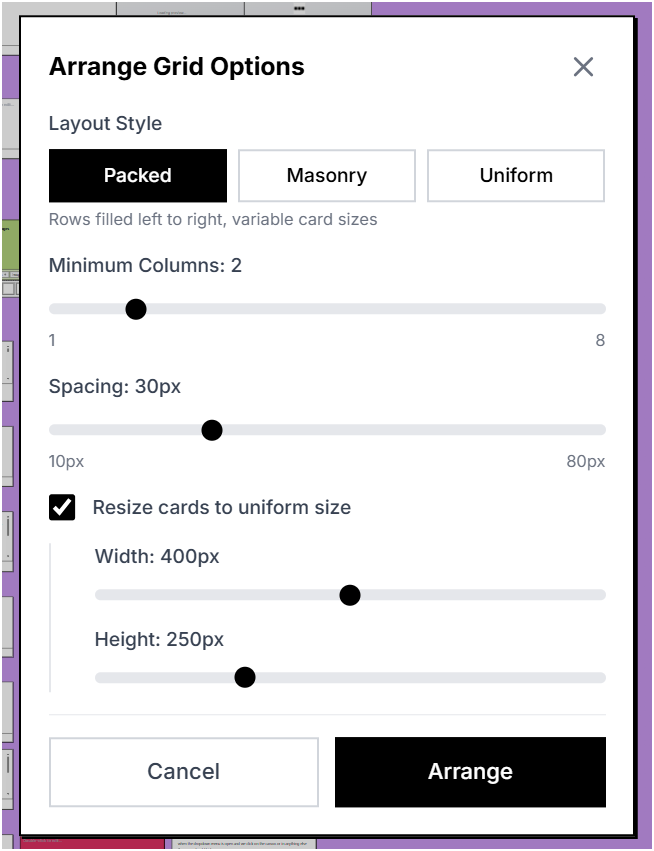
This one is for you Amanda!
- Non-Overlapping Card Placement: New cards are now automatically placed in positions that don't overlap with existing cards. Uses a spiral search pattern to find the nearest free space from the viewport center.
- Radix Navigation Menu: Replaced the top toolbar with a unified Radix UI Navigation Menu combining Add, Search, and Tools dropdowns with smooth animations.
- Search Excludes Drawings: Drawing cards are now excluded from search results since they contain no searchable text content.
↑ Improvements
- Consistent Dialog Styling: Tags dialog now uses the same centered modal pattern as the Color Picker for a consistent user experience.
- Dropdown Menu Alignment: Fixed dropdown menus in the navigation to properly align under their trigger buttons.
~ Bug Fixes
- Multi-Card Deletion: Fixed a bug where dragging multiple selected cards to the trash would only delete the first card. All selected cards are now properly deleted.
- Mobile Selection Mode: Fixed touch-based selection on mobile devices. Previously, the canvas would pan while trying to draw a selection box. Touch events now correctly trigger selection instead of panning when in select mode.
- Pull-to-Refresh Prevention: Prevented the browser's pull-to-refresh gesture from triggering when drawing selection boxes on mobile.
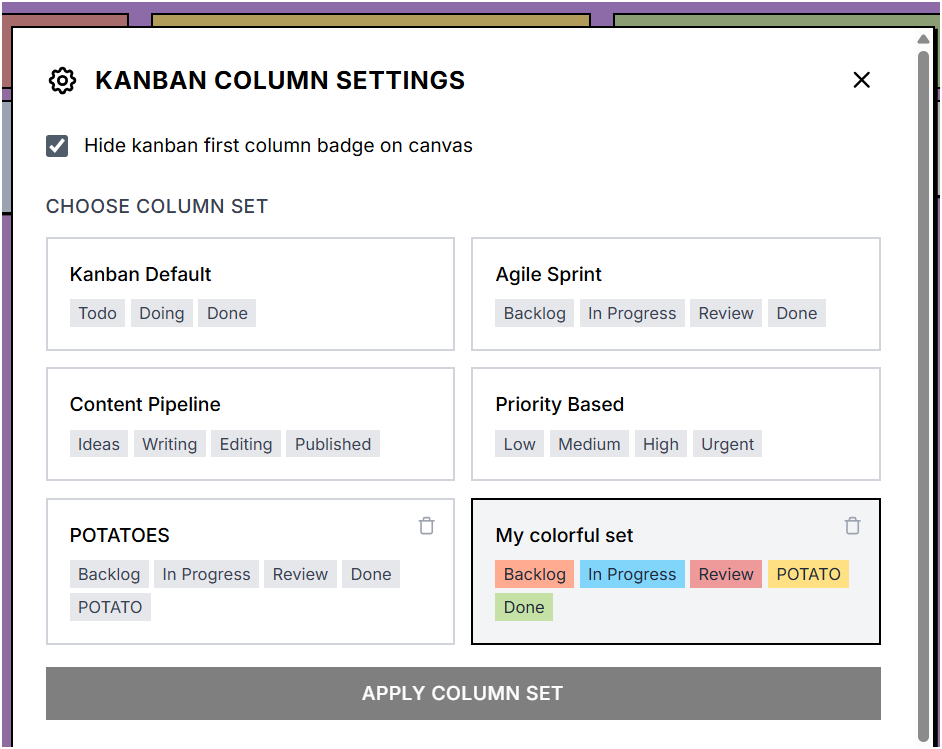
Kanban Column Settings: Choose and preview column sets with colors. Just the way you asked Raquel! 😊
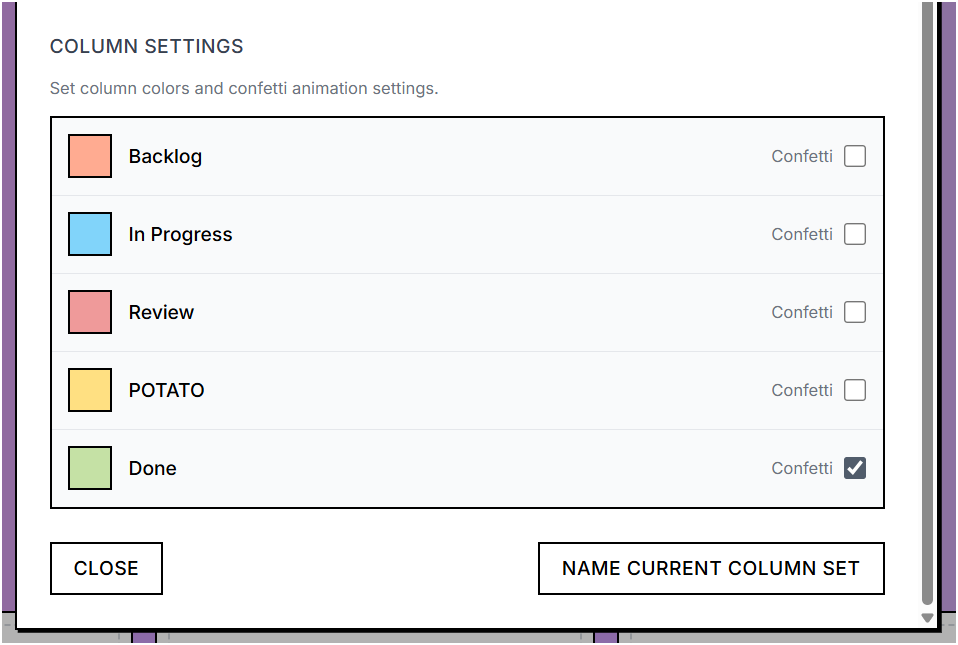
Column Settings: Set colors and confetti animations per column
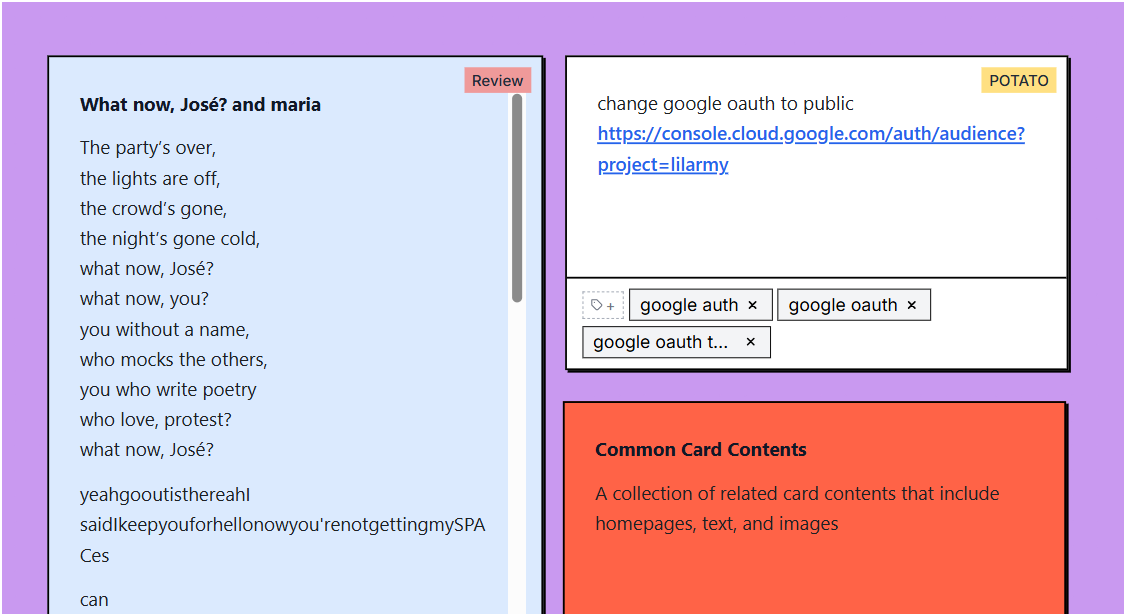
Canvas View: Cards display colored kanban status badges
♥ Thank You
Special thanks to the following individuals for their feedback and contributions to this release:
- Amanda Atsumi
- Alex Raffa
- Carlos Monteiro
- Deepesh Mehta
- Raquel Lima
January 2, 2026
+ New Features
- Tabbed Configuration Panel: Reorganized settings into Appearance, Behavior, and Search tabs for easier navigation using Radix UI tabs component.
- Card Font Size Setting: Customize the text size in cards with a slider ranging from 12px to 24px (default: 18px).
- Paragraph Spacing Setting: Adjust the space between paragraphs in cards from 0 to 3em (default: 1.5em).
- Interface Background Color: Choose from preset color swatches or pick a custom color for the canvas background.
- Configurable Add Child Delay: Customize how long to hold a card over a drop zone before adding it as a child (300ms to 2000ms, default: 700ms).
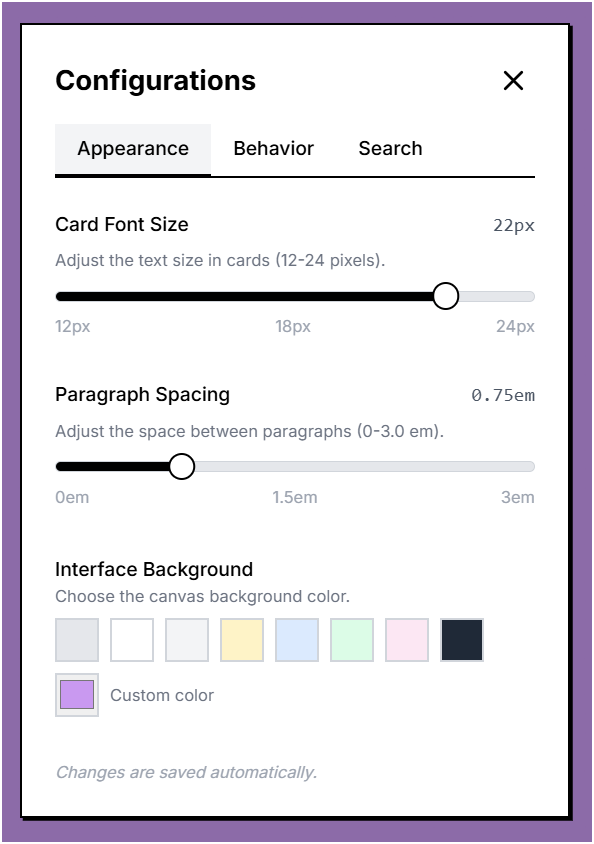
Appearance Tab: Font size, paragraph spacing, and background color
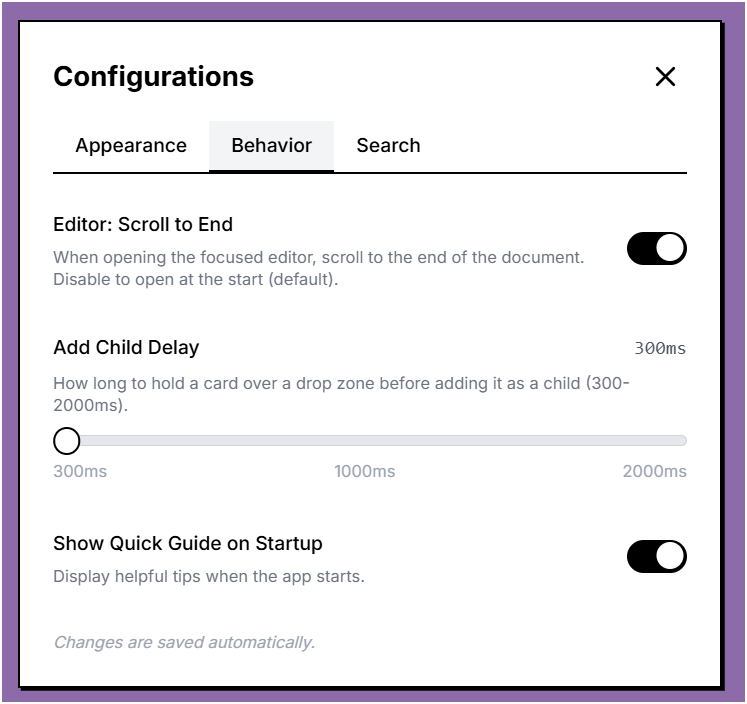
Behavior Tab: Editor scroll, add child delay, and quick guide
↑ Improvements
- Radix UI Sliders: Replaced native HTML range inputs with accessible Radix UI slider components for better user experience.
- Reduced Default Dwell Time: Changed the default add-child delay from 1000ms to 700ms for faster interaction.
December 31, 2025
+ New Features
- Linker-Organizer Flow: The Linker agent now automatically fetches content from URLs and generates summaries. A new LINK_SUMMARY_GENERATED event triggers the Organizer to classify link cards with tags.
- Confetti Celebration: Added celebratory confetti animations for special moments.
~ Bug Fixes
- CORS Proxy Fix: Reordered CORS proxies and added better network error handling to address ERR_QUIC_PROTOCOL_ERROR issues.
- About Dialog Logo: Fixed the logo path to use the correct image at /app/organizer-head.png.
- File Card Improvements: File upload now accepts all file types.
December 28, 2025
+ New Features
- Content Extraction Timeout: Added configurable timeout (default 30 seconds) for content extraction from URLs. Users are notified when extraction fails with the URL and reason.
- Move to Parent Improvements: Enhanced drag-to-move behavior with visual loading animation matching the delete action. Any part of the card can now trigger the action.
~ Bug Fixes
- Mobile View: Fixed parent card information display on mobile devices.
- Pan Behavior: Pan mode now properly stops when dragging to move a card to parent level.